Got email?

we do copy pastey, you do thinky worky.

  • Works with Monday, Asana, ClickUp, Jira
  • AI summary, priority, due date extraction
  • Forward, BCC, or CC workflows
  • Update existing tasks
Start Free

They dump your emails as a blob. Casso does the work for you.
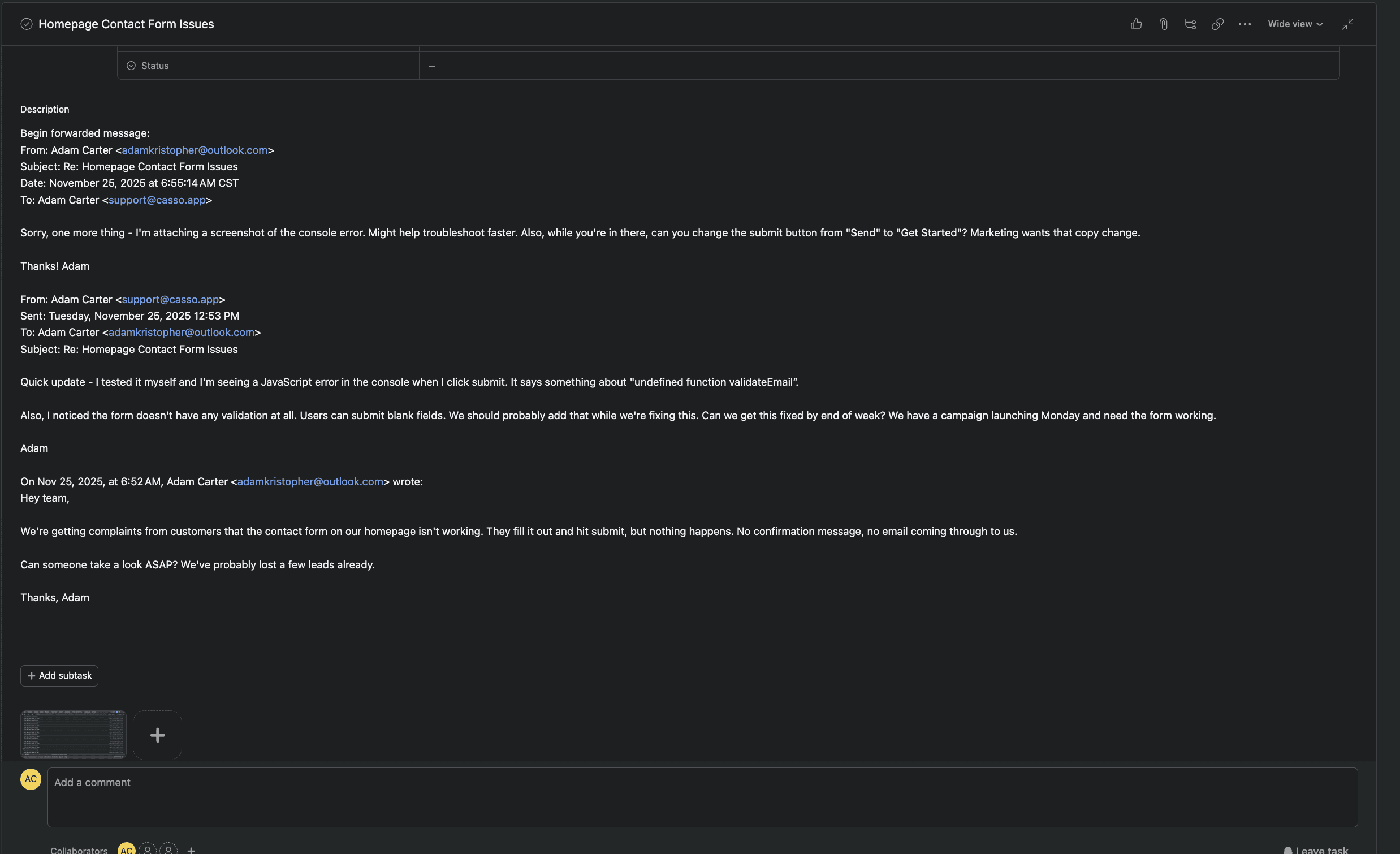
Native email-to-task dumps thread as blob textCasso parses email thread into separate commentsCasso AI generates summary from email thread

No add-ons, extensions, or zaps. Just forward.

You've been asking for email-to-task fixes for years.

We built them.

Parse threads into commentsRoute to existing tasksCapture To/CC/From/DateExtract due dates & priorityBCC & CC workflowsand more!

"Seems ridiculous that what many regard as a basic requirement has still not been added some 7 years later!"

Asana

Jason_Living, Asana

"I've used MANY other project/ticketing systems and they all have had a link or special email address that I can include in the CC section of my email. Is there nothing like this available?"

Asana

Lee_Staats, Asana

"Flowsana seems like a nice integration... I have two asana organizations with close to 100 in each, and the $2.99/mo/user is about $7000/year."

Asana

Jeremy_Levy, Asana

"My workaround is to create a new task with the Gmail addon; and then to 'nest' that task as a subtask of my target task. That represents a few extra clicks but that's functional enough."

Asana

Arthur_BEGOU, Asana

"Any new response that we receive creates a new ticket. The response email also appears in the original ticket so we have to manually delete the new ticket. We get a lot of emails and this is time consuming for my team."

Monday.com

Polly Cordwell, Monday.com

"This is kinda critical feature for a CRM. If our customer CC's someone on a support request they are going to expect that the person who is CC'd also receives the response we send."

Monday.com

Chris Bolton, Monday.com

"Without having access to the original email headers and only having access to the subject and body, it really limits what we can accomplish."

Monday.com

Jake D., Monday.com

"The formatting and clutter and never ending scrolling - forwarding an email to the task is frustrating because it does not help with productivity at all."

ClickUp

Bernadette Campbell, ClickUp

"We absolutely need this feature to be able to use ClickUp as a CRM alternative to HubSpot. Without it ClickUp is unusable as a CRM for us."

ClickUp

Sergio Fandila, ClickUp

"When you create a task from email (a customer send the email) is super important to have the 'From' email in a field that you can use in an automation."

ClickUp

Carlos Villar, ClickUp

"It is surprising this is such an old issue and after so many years it is still not resolved."

Jira

Alan Zhang, Jira

"Unfortunately, not within native Jira Service Management. The email handlers are rather basic in that Summary > Summary and Body > Description."

Jira

Steve Long, Jira

"Replies are made to the thread, it creates new issues rather than adding comments to the case itself."

Jira

Dan Froelich, Jira

"Is there a way I can use an automation to extract keywords from the Summary and Description to assign other Custom Field values?"

Jira

Ruby Cevallos, Jira

"Seems ridiculous that what many regard as a basic requirement has still not been added some 7 years later!"

Asana

Jason_Living, Asana

"I've used MANY other project/ticketing systems and they all have had a link or special email address that I can include in the CC section of my email. Is there nothing like this available?"

Asana

Lee_Staats, Asana

"Flowsana seems like a nice integration... I have two asana organizations with close to 100 in each, and the $2.99/mo/user is about $7000/year."

Asana

Jeremy_Levy, Asana

"My workaround is to create a new task with the Gmail addon; and then to 'nest' that task as a subtask of my target task. That represents a few extra clicks but that's functional enough."

Asana

Arthur_BEGOU, Asana

"Any new response that we receive creates a new ticket. The response email also appears in the original ticket so we have to manually delete the new ticket. We get a lot of emails and this is time consuming for my team."

Monday.com

Polly Cordwell, Monday.com

"This is kinda critical feature for a CRM. If our customer CC's someone on a support request they are going to expect that the person who is CC'd also receives the response we send."

Monday.com

Chris Bolton, Monday.com

"Without having access to the original email headers and only having access to the subject and body, it really limits what we can accomplish."

Monday.com

Jake D., Monday.com

"The formatting and clutter and never ending scrolling - forwarding an email to the task is frustrating because it does not help with productivity at all."

ClickUp

Bernadette Campbell, ClickUp

"We absolutely need this feature to be able to use ClickUp as a CRM alternative to HubSpot. Without it ClickUp is unusable as a CRM for us."

ClickUp

Sergio Fandila, ClickUp

"When you create a task from email (a customer send the email) is super important to have the 'From' email in a field that you can use in an automation."

ClickUp

Carlos Villar, ClickUp

"It is surprising this is such an old issue and after so many years it is still not resolved."

Jira

Alan Zhang, Jira

"Unfortunately, not within native Jira Service Management. The email handlers are rather basic in that Summary > Summary and Body > Description."

Jira

Steve Long, Jira

"Replies are made to the thread, it creates new issues rather than adding comments to the case itself."

Jira

Dan Froelich, Jira

"Is there a way I can use an automation to extract keywords from the Summary and Description to assign other Custom Field values?"

Jira

Ruby Cevallos, Jira

"Most often, project tasks are already created by the time email communication is happening. The inability to add an email or multiple emails to the relevant task without creating a new task really defeats the efficiency of this automation."

Asana

mikedfarrell, Asana

"I expect to be able to have first message of thread to become Task, and all subsequent replies to become comments in that task."

Asana

Myroslav_Opyr, Asana

"Adding this functionality to Asana would be a game changer for those of us who rely on email-to-task workflows."

Asana

mortimermouse, Asana

"Email integration is, to be blunt, awful."

Monday.com

Kenneth Obel, Monday.com

"Simply using an item specific bcc address to couple email conversations to that item would suffice but I cannot find this option."

Monday.com

Jorrit, Monday.com

"We have raised this issue several times with the monday.com team but we haven't received a timeline for when this could be solved."

Monday.com

Matias Pulido, Monday.com

"We're hoping there's a way to simply update the original ticket and change the status so we know there's been a reply without a new item being created."

Monday.com

Polly Cordwell, Monday.com

"Having a task created from an email into a list means nothing if all of the email information is not included in the task. So we have to go back to the email box anyway."

ClickUp

Ashley Sosa, ClickUp

"We need to be able to see who the reporter has designated as a stakeholder (via CC) on an incoming email."

ClickUp

Jordan Layman, ClickUp

"If someone sees the attached task's email, he has not the right information. Or the information could lead to misinformation!"

ClickUp

Vincent Brès, ClickUp

"Simply adding the TO/CC field info to the description would solve this situation for us, but I can't see any way to do that."

Jira

Jake Sommer, Jira

"It's a little frustrating to have 10 email signatures with images in the comment section."

Jira

Danielle Alota, Jira

"Despite setting the option to strip quotes and enable HTML email parsing to enabled status our issues are created with overly verbose descriptions."

Jira

Douglas Mort, Jira

"Most often, project tasks are already created by the time email communication is happening. The inability to add an email or multiple emails to the relevant task without creating a new task really defeats the efficiency of this automation."

Asana

mikedfarrell, Asana

"I expect to be able to have first message of thread to become Task, and all subsequent replies to become comments in that task."

Asana

Myroslav_Opyr, Asana

"Adding this functionality to Asana would be a game changer for those of us who rely on email-to-task workflows."

Asana

mortimermouse, Asana

"Email integration is, to be blunt, awful."

Monday.com

Kenneth Obel, Monday.com

"Simply using an item specific bcc address to couple email conversations to that item would suffice but I cannot find this option."

Monday.com

Jorrit, Monday.com

"We have raised this issue several times with the monday.com team but we haven't received a timeline for when this could be solved."

Monday.com

Matias Pulido, Monday.com

"We're hoping there's a way to simply update the original ticket and change the status so we know there's been a reply without a new item being created."

Monday.com

Polly Cordwell, Monday.com

"Having a task created from an email into a list means nothing if all of the email information is not included in the task. So we have to go back to the email box anyway."

ClickUp

Ashley Sosa, ClickUp

"We need to be able to see who the reporter has designated as a stakeholder (via CC) on an incoming email."

ClickUp

Jordan Layman, ClickUp

"If someone sees the attached task's email, he has not the right information. Or the information could lead to misinformation!"

ClickUp

Vincent Brès, ClickUp

"Simply adding the TO/CC field info to the description would solve this situation for us, but I can't see any way to do that."

Jira

Jake Sommer, Jira

"It's a little frustrating to have 10 email signatures with images in the comment section."

Jira

Danielle Alota, Jira

"Despite setting the option to strip quotes and enable HTML email parsing to enabled status our issues are created with overly verbose descriptions."

Jira

Douglas Mort, Jira

"I have hundreds of email threads for one task that I have to add as a comment manually every time."

Asana

Lee_Staats, Asana

"I'd have to rebuild Gmail threading logic with email header interpretations, probably some Subject heuristics, and some lookup table to map threads to asana tasks. Thus some ready-to-use solution would be welcome."

Asana

Myroslav_Opyr, Asana

"Just started playing around with this feature and this is a huge letdown so I hope it gets some attention!"

Asana

Sam_Tabor, Asana

"Transparently, we do not have any concrete plans to further develop this feature at this time."

Monday.com

Bianca Taylor (Monday.com staff), Monday.com

"It only records the subject line and the body of the email. There is no way to see the following info: To, CC, From, Date."

Monday.com

Mike (MikeInSaaS), Monday.com

"Still the same issues it seems in October 2024."

Monday.com

Paul Farrell, Monday.com

"Sometimes it's like the (remaining) devs don't even use their own product."

ClickUp

Daniel Basse, ClickUp

"If you can email to a task to start the thread, opening a new thread for every reply is a major mistake. Most other systems will automatically parse email threads into the appropriate workflow for you."

ClickUp

Andrew Olson, ClickUp

"When we respond through ClickUp (which requires manual copying and pasting of the email from the task description), these individuals are effectively removed from the loop."

ClickUp

Reece Dixon, ClickUp

"Having duplicates adds a lot of admin work to delete duplicate data."

ClickUp

ARIA, ClickUp

"CC'd e-mails are still getting missed when added by client's initial email. All CC'd email addresses are dropped from request and only the TO sender is displayed."

Jira

Rachael Bumb, Jira

"When people reply to an email in outlook, it adds a new 'To, sent, CC, subject' section from the email that was sent in the first place, which gets added to the comment in Jira SD."

Jira

Egunsuren, Jira

"Is there any way to automatically get some information from email request send by customer and put them to the prepared already custom JIRA fields?"

Jira

Anna Arczynska, Jira

"I have hundreds of email threads for one task that I have to add as a comment manually every time."

Asana

Lee_Staats, Asana

"I'd have to rebuild Gmail threading logic with email header interpretations, probably some Subject heuristics, and some lookup table to map threads to asana tasks. Thus some ready-to-use solution would be welcome."

Asana

Myroslav_Opyr, Asana

"Just started playing around with this feature and this is a huge letdown so I hope it gets some attention!"

Asana

Sam_Tabor, Asana

"Transparently, we do not have any concrete plans to further develop this feature at this time."

Monday.com

Bianca Taylor (Monday.com staff), Monday.com

"It only records the subject line and the body of the email. There is no way to see the following info: To, CC, From, Date."

Monday.com

Mike (MikeInSaaS), Monday.com

"Still the same issues it seems in October 2024."

Monday.com

Paul Farrell, Monday.com

"Sometimes it's like the (remaining) devs don't even use their own product."

ClickUp

Daniel Basse, ClickUp

"If you can email to a task to start the thread, opening a new thread for every reply is a major mistake. Most other systems will automatically parse email threads into the appropriate workflow for you."

ClickUp

Andrew Olson, ClickUp

"When we respond through ClickUp (which requires manual copying and pasting of the email from the task description), these individuals are effectively removed from the loop."

ClickUp

Reece Dixon, ClickUp

"Having duplicates adds a lot of admin work to delete duplicate data."

ClickUp

ARIA, ClickUp

"CC'd e-mails are still getting missed when added by client's initial email. All CC'd email addresses are dropped from request and only the TO sender is displayed."

Jira

Rachael Bumb, Jira

"When people reply to an email in outlook, it adds a new 'To, sent, CC, subject' section from the email that was sent in the first place, which gets added to the comment in Jira SD."

Jira

Egunsuren, Jira

"Is there any way to automatically get some information from email request send by customer and put them to the prepared already custom JIRA fields?"

Jira

Anna Arczynska, Jira

Plays nice with these and from any email platform. No zaps, no bugs, you're not a bug zapper.

Three Ways to Forward Stuff

I use all three depending on my mood.

WorkflowHow It WorksAuto-Threads?Other Party Sees Casso?
Just Forward ItEasy Mode
Forward any email to CassoNoNo
The Sneaky OneNobody Knows
BCC Casso when you send, forward replies with ticket:xxxxNoNo
The Fancy OneFull Auto
CC Casso with ticket:xxxx in subject - replies auto-routeYesYes

Just Forward It

Easy Mode

Got an email? Forward it. That's it. I do this one a lot.

The Sneaky One

Nobody Knows

BCC means they can't see it. I learned that the hard way.

The Fancy One

Full Auto

This one does everything automatically. I barely have to think. Which is good.

I Want 50%!

Juuust kidding, a couple coffees a month keeps those chain letters going. 'Cause who needs 7 years bad luck?

Free

$0/mo

10 emails/month

  • 10 emails/month
  • 1 PM platform
  • Basic AI processing
  • Email attachments
  • Community support
Start Free
Most Popular

Pro

$10/mo

100 emails/month

  • 100 emails/month
  • All 4 PM platforms
  • Advanced AI summaries
  • Priority detection
  • Deadline extraction
  • Email support
Start Pro

Business

$40/mo

500 emails/month

  • 500 emails/month
  • All 4 PM platforms
  • Full AI enrichment
  • Thread comment sync
  • Priority support
  • Usage analytics
Start Business

Enterprise

$120/mo

2000 emails/month

  • 2,000 emails/month
  • All 4 PM platforms
  • Custom integrations
  • Dedicated support
  • SLA guarantee
  • API access
Start Enterprise

Frequently Asked Questions

Everything you need to know about forwarding emails to your work management platform.

Casso gives you a unique email forwarding address. When you forward any email to this address, our AI processes it and creates a task in your PM tool (Jira, ClickUp, Asana, or Monday.com) with an AI-generated summary, extracted priority, due dates, saves attachments, and stores the email replies as comments in the task.

Still have questions?

We're here to help. Reach out and we'll get back to you within 24 hours.

support@casso.app